Saving Christmas: Technical Cinematography for TVNZ

Working as a freelance cinematographer in New Zealand, I’ve shot everything from high-end corporate interviews to run-and-gun documentaries. But every now and then, a script lands in my inbox that requires a distinct blend of creative lighting and rigorous technical discipline.

I recently teamed up with TVNZ to shoot a Christmas TVC for Woolworths. The premise was high-stakes holiday drama: Santa’s reindeer were out of carrots, and alarms were blazing in the “Santa Control Center.”

The Challenge: A Fixed World

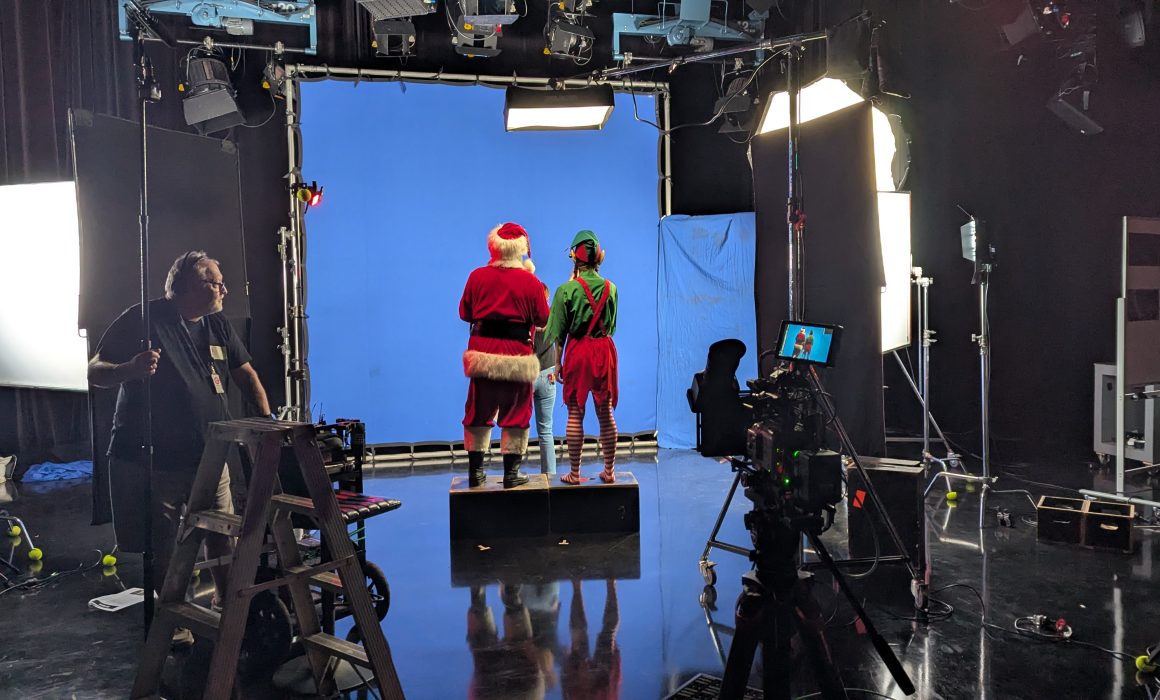
To transport our talent into the high-tech digital world of the Control Center, we utilized a 12x12ft blue screen frame.

Why blue instead of the industry-standard green? Simple physics: our Elf was wearing a bright green costume. If we had used a green screen, he would have become invisible, blending right into the background. So, blue it was.

While this solved the wardrobe issue, working within the confines of a fixed 12x12ft frame introduced a significant geometric challenge. We needed to capture the frantic interaction between Santa and the Elf from multiple angles, but the relationship between the camera and the blue background had to remain fixed to ensure coverage. If I moved the camera too far to get a side angle, I would shoot off the edge of the blue screen.

Moving the Set, Not the Camera

To solve this, we couldn’t simply move the camera around the actors. Instead, we had to rotate the entire set around the camera.

This required meticulous lighting prep. Before we rolled, I sketched out the lighting plan for the “real world” of the Control Center, determining exactly where the alarm lights and console glows would originate in the virtual space.

For every setup change, we physically rotated the actors and props relative to the blue screen. I then had to re-rig the floor lighting for every single angle. The goal was to ensure that even though the physical set had moved, the light hitting the actors’ faces maintained the continuity of the virtual background.

The “Cleanest Key”

Having extensive experience with visual effects (VFX) and chroma keying, I know that a composite is won or lost in the camera. It’s not just about lighting the talent; it’s about achieving perfect separation and even exposure on the screen itself to ensure the digital background doesn’t stick out as a sore thumb.

I applied strict technical standards to the lighting ratios to make life easy for the editors. It was incredibly validating to hear back from the post-production team that this was the cleanest blue screen key they had ever received.

They were thrilled with how effortlessly the footage keyed out, which meant they could spend less time fixing technical issues and more time polishing the final creative look.

Mission Accomplished

It was a technically demanding shoot, but delivering high-quality rushes that make the post-production workflow smooth is one of the most satisfying parts of the job.

Plus, I’m happy to report that the mission was a success. The carrots were restocked, the alarms were silenced, and the reindeer were fully fueled for the big night. Just another day at the office helping to save Christmas!

Here is the finished 30sec TVC

  • Production – TVNZ Blacksand
  • Creative Director – Shannon Addison
  • Creative Producer – Will Munro
  • Head of Production – Varsha Singh
  • Commercial Producer – Xanthe Price
  • DOP – Christo Montes
  • Gaffer – Paul Eversden
  • Technical Manager – Ryan Everitt
  • Sound Operator – Eugene Arts
  • Offline Editor – Will Munro
  • Online Editor – Nick Henderson
  • Grade – Gareth Pearce
  • Sound Mix – Roger Green


FX6 LUT workflow for FS7 users

By Christo Montes, Cameraman/Cinematographer – Auckland New Zealand

The new Sony FX6 is out and I consider myself lucky as cameraman since I was able to grab one of the first to arrive in Auckland, New Zealand. I immediately put it alongside my trusty FS7 and started shooting on it with excellent results. However, it did take a bit of time to get used to some different ways of doing things, one of which was the MLUT handling.

The FX6 does not follow the traditional system of the F5, FS7, FX9 of applying MLUTs in CineEI mode. It doesn’t even follow the traditional Sony way of doing things in Custom mode either and Alister Chapman has a very detailed and in depth post of how that has changed here .

The big difference is that now both CineEI mode and Custom mode have the same menu setting for changing the look and it’s conveniently named… Base Look/LUT.

In this new menu you will find the first 3 slots marked by the P in the beginning which contain the 3 stock Sony looks, S-Cinetone, 709(800) and Slog3. The next slots marked from 1-10 are the custom slots where you can load your LUTs from the SD card and keep there for using BOTH in Custom AND CineEI modes.

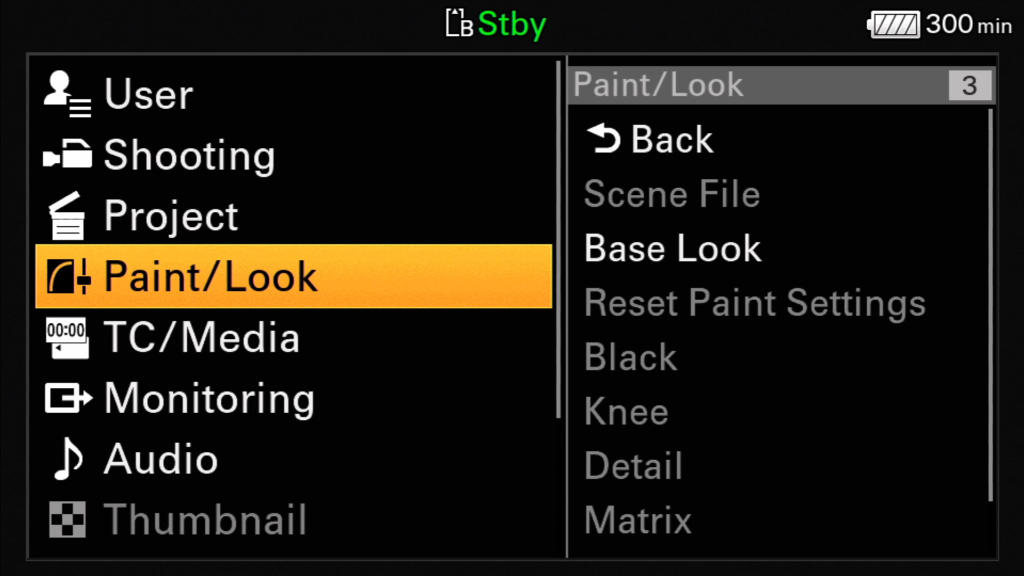
Base Look/LUT can be found under the Paint/Look menu option,

Paint/Look -> Base Look

or on page 5/10 of the touch menu

So don’t go looking for an MLUT menu or a way to load LUTs for CineEI. There is none any more. All image manipulating is now done with LUTs that are loaded in this new space (Base Look/LUT) that is used BOTH for Custom AND CineEI modes. But as Alister Chapman explains in his post, in custom you have the ability to change the look of the image while the LUT is on it, whereas in CineEI you can not. So the Hyper and 709 gammas of previous professional cameras are no longer there as options, but instead have to be loaded as LUTs. The cool part is that those same LUTs can be used as monitoring LUTs when you are in CineEI mode too.

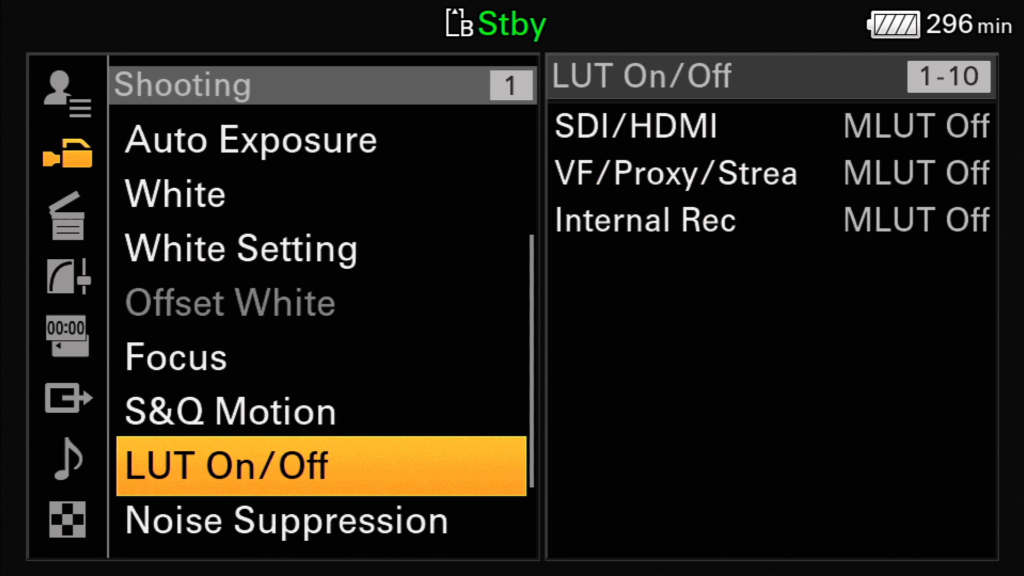
And while I mention monitoring, in CineEI mode you can now choose your MLUT options independently from the LUT On/Off option in the Shooting menu. You can apply the LUT on the outputs, the VF/Proxy/Stream and the recording (for burning the LUT in) and this setting will also apply to S&Q and playback.

This took me a bit of time to figure out myself and admittedly it threw me off at first, coming from an FS7, but with the flexibility and ease of how LUTs can be created nowadays I find it an extremely simple and effective way of customizing the look of the camera and definitely the way to go forward.


Welcome

This is my first blog post and the intention is to make a post every few weeks in order to give out a bit of information around recent shoots, techniques, challenges and solutions that I have come across as a cameraman.

As a welcome post I just want to throw out there a bit more info about me so you can get to know me a bit better.

So, I am originally from Athens, Greece. Born and bred in the land of philosophy and tourism from a Greek dad and a mum that was raised in a farm close to Te Kuiti. If you wonder how she ended up in Greece, that’s another story, probably a post on it’s own. So, having 2 nationalities was quite tempting and my family and I decided to give Aotearoa a go by migrating to New Zealand in 2010.

During my time in Greece, I ran a small video production company with my brother and we specialized more in the wedding and low budget corporate video area. Business was good, but one day we both decided to drop everything and f off to the other side of the planet. When we arrived in NZ and having no idea whatsoever about either trade or food, we decided to start up a food importing company. Talking about a massive leap and learning curve! We had to figure out how business works in this part of the world, the relationships, the jargon, legislation, accounting, etc. Everything was totally different and very hard to adapt to, leading to a few tough years to start with.

My restless creativity though didn’t let me focus only on the importing business, so I started seeking work in the area I loved most, which is being behind a lens. So after getting to meet some people I gradually started to shoot some weddings for Creative Video (thanks Craig, you’re a legend) in New Zealand. Then, through some networking and cold calling I was fortunate to connect with TVNZ in 2011. I will not forget the day John, the TVNZ Production Services manager, took me down into the camera store, handed me a camera and said:

“Here are our production cameras… You have an hour to familiarize yourself with them and in a few days we’ll send you out on a shoot”

At the time, although very confident around cameras, I had absolutely no experience in shooting content for broadcast, hence my stress levels were running quite high. So after exploring the camera for an hour or so I left the camera store and waited for the call. Sure enough a couple of days later I got my first broadcast job for TVNZ, for a program called Tagata Pasifika. At the time I had no idea that until this day and after 8 years of a constantly evolving broadcast environment, I would still be working with the Tagata Pasifika team helping them produce some very inspiring Pacific stories.

TheTVNZ  logo used back in those days!

One of the first gigs I did for TVNZ. Phone cameras were pretty crap back in those days.

So TVNZ aside, I kept on building more local experience and in 2014 I decided to go full freelance and get out of the food importing business. I bought my first large sensor camera, a second hand Canon C300 and gradually started building a shooting package. As everyone knows this is a never ending process, which has lead me to today own a Sony FS7 with a full range of lenses, sound gear, a full lighting package, a small b cam (a6300) on a gimbal, on set monitors, accessories, and it goes on and on.

And that’s where we are today. Where I start a blog and put myself out there with no real idea how this is going to pan out. But hey, winging it has kind of worked so far, so why not keep on with it?

See you in the next one.

All the best.


Contact

hello@christomontes.com
Auckland, New Zealand
+64211857803

Connect
Privacy Settings
We use cookies to enhance your experience while using our website. If you are using our Services via a browser you can restrict, block or remove cookies through your web browser settings. We also use content and scripts from third parties that may use tracking technologies. You can selectively provide your consent below to allow such third party embeds. For complete information about the cookies we use, data we collect and how we process them, please check our Privacy Policy
Youtube
Consent to display content from - Youtube
Vimeo
Consent to display content from - Vimeo
Google Maps
Consent to display content from - Google